How To Go Paperless On Gusto
Hi Team,
As we plan ahead for next year’s tax season, we wanted to let you know about the option to receive your tax documents (W-2s and 1099s) digitally through Gusto. While it’s entirely your choice, we highly encourage switching to paperless delivery for future tax documents.
Going paperless is more secure and reliable than receiving forms by mail. Digital delivery allows you to access your tax documents as soon as they’re available, securely download them anytime, and avoid delays or misdelivery that can happen with the U.S. mail.
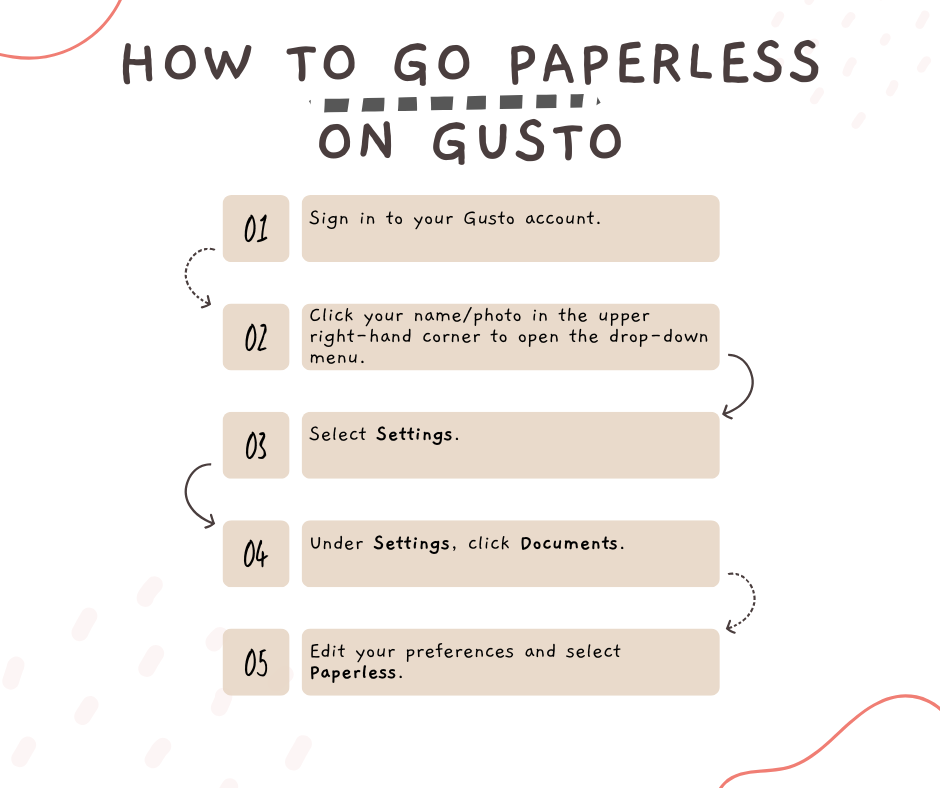
If you’d like to switch to paperless delivery in Gusto, here’s how:
-
Sign in to your Gusto account.
-
-
Click your name/photo in the upper right-hand corner to open the drop-down menu.
-
Select Settings.
-
Under Settings, click Documents.
-
-
Edit your preferences and select Paperless.
If you have any questions or would like a quick walkthrough via Zoom, Amara would be happy to help. Email her to set up a meeting at amara@alphainterpreters.com.
Thank you for considering this option and helping us move toward a more secure and efficient process.
Here’s a helpful article explaining the benefits of digital tax forms: The Benefits of Getting Your W2 Electronically (And How to Do It)